Terms version 2026-10-15-v1 · effective 15 October 2026
Buy MaxBoost
Get your PC code, complete secure payment, and activate MaxBoost on your Windows PC. €14Previous price €39.9064.9% OFF one-time for one PC.
Get ready to use MaxBoost
€14Previous price €39.9064.9% OFF one-time · permanent license for one Windows PC · free updates
1
Download & open MaxBoost
Install MaxBoost on the Windows 10 or 11 PC you intend to activate, then open the app.
Download MaxBoostDownloading does not charge you. License: €14
Previous price €39.9064.9% OFF one-time for one PC.2
Buy your license — €14
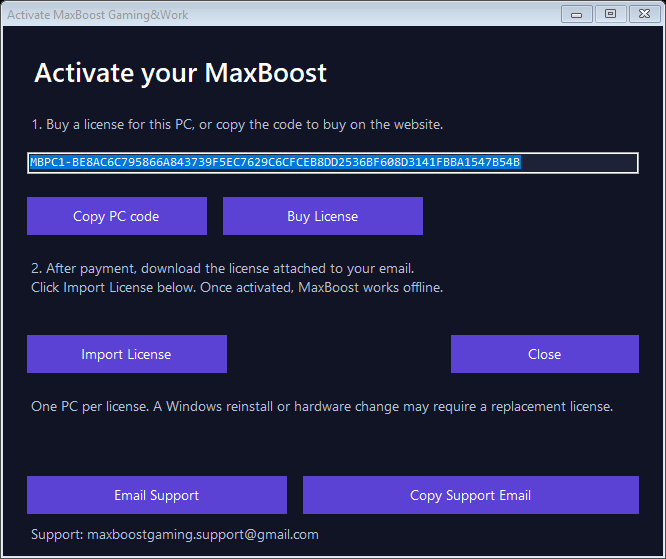
Previous price €39.9064.9% OFFIn MaxBoost, click Buy License. Your PC code is filled in automatically. Enter your name, email and billing country, then pay securely with Stripe.
Purchasing is available only for countries marked Available now below.
3
Activate MaxBoost
After payment, download the .maxboostlicense attachment from your email. Open MaxBoost on the same PC, click Import License and select the file.
Delivery usually completes in 1–5 minutes and no later than 1 hour after confirmed payment. If something unexpected happens or your license email does not arrive, contact maxboostgaming.support@gmail.com with your order reference. Do not pay again.
Check your spam folder and the email address used for your purchase. Your license and receipt are sent after payment verification and receipt processing.
Where you can buy
Checking purchase availability…
Greek sales qualifying under the seller’s small-business VAT exemption are €14Previous price €39.9064.9% OFF final with no VAT charged, while the seller remains within the monitored exemption limits. This is not a worldwide VAT exemption; the final amount for your location is shown on the payment page before you pay.
30 planned destinations: Greece and 29 foreign countries. A destination can be ordered from only when it is marked “Available now”; others show their current status.
European Union · 27 countries
- AustriaChecking…
- BelgiumChecking…
- BulgariaChecking…
- CroatiaChecking…
- CyprusChecking…
- CzechiaChecking…
- DenmarkChecking…
- EstoniaChecking…
- FinlandChecking…
- FranceChecking…
- GermanyChecking…
- GreeceChecking…
- HungaryChecking…
- IrelandChecking…
- ItalyChecking…
- LatviaChecking…
- LithuaniaChecking…
- LuxembourgChecking…
- MaltaChecking…
- NetherlandsChecking…
- PolandChecking…
- PortugalChecking…
- RomaniaChecking…
- SlovakiaChecking…
- SloveniaChecking…
- SpainChecking…
- SwedenChecking…
Australia, New Zealand & Singapore · 3 countries
- AustraliaPlanned
- New ZealandPlanned
- SingaporePlanned
Country not listed? Purchases are not currently available in your country. Contact us to register your interest.
Email us to register your interest
The link opens your email app so you can send the message yourself. Nothing is sent automatically and this website does not store your email address.
Registering interest does not promise a launch date or automatic notifications, and no license is reserved.
The United States and the United Kingdom are not available. Other destinations are not available at launch.
Purchasing is available only for destinations shown as available above at the time of purchase. Availability is not automatic or worldwide.
Price
Qualifying Greek sales: €14Previous price €39.9064.9% OFF final, with no VAT charged under the seller’s Greek small-business VAT exemption. Purchasing is available only for destinations shown as available on the purchase page. For enabled EU destinations, qualifying sales are also €14Previous price €39.9064.9% OFF final with no VAT charged under the same Greek small-business exemption, within its monitored limits. Non-EU destinations remain planned. The final amount is shown on the payment page before you pay.
This is a seller exemption, not a zero-rated product or a worldwide VAT exemption.
One-time payment for a permanent license for one Windows 10 or 11 PC, with free updates. No subscription.
Game prerequisites are free third-party components. The MaxBoost license price is for MaxBoost's own features; no charge is made for the prerequisites.
Checkout issues standard retail receipts. If you are buying for a business and need an invoice with your company details or VAT ID, contact support before paying; this is not arranged automatically. Some consumer rights described here, such as the right of withdrawal, apply to consumers and may not apply to business purchases.
Greek small-business VAT exemption
Receipt wording: Χωρίς Φόρο Προστιθέμενης Αξίας – Απαλλαγή μικρών επιχειρήσεων (English: “Without Value Added Tax – Small business exemption”). Reference: AADE 2026 small-business scheme FAQ.
Before you buy
Install the app from Downloads & Updates and check the system guidance in Tutorial & Manual.
Performance results vary by hardware, software and selected settings. No particular FPS, speed or productivity result is promised.
How purchasing works
- Download and install MaxBoost from the Downloads & Updates page on the Windows PC you intend to activate.
- In MaxBoost, click Buy License. Your PC code is filled in automatically. Copy PC code and manual paste remain available as a backup.
- Where your country is shown as available, enter your name, email and billing country on the secure checkout page.
- Review the final amount and applicable tax treatment on the Stripe payment page before you pay. Qualifying sales are €14
Previous price €39.9064.9% OFF final with no VAT charged under the seller’s Greek small-business exemption. - After your payment is verified and your receipt is processed, download the .maxboostlicense attachment from your email. Delivery usually completes in 1–5 minutes and no later than 1 hour after confirmed payment. If something unexpected happens or your license email does not arrive, contact maxboostgaming.support@gmail.com with your order reference. Do not pay again.
- Open MaxBoost on the same PC whose code you supplied, choose Import License and select the downloaded file.
You can complete the purchase in a browser on another computer or phone. The license binds only to the PC code you supply, not to the device used for payment.
If Stripe offers to verify or save a Stripe Link account, that is a separate Stripe step and is not MaxBoost activation. MaxBoost is activated only by importing the license file.
Delivery
The signed license file, receipt PDF and a text copy of these purchase and license terms (with your order reference, terms version, time and your delivery acknowledgement) are sent by email after your payment is verified and your receipt is processed. Delivery usually completes in 1–5 minutes and no later than 1 hour after confirmed payment. If something unexpected happens or your license email does not arrive, contact maxboostgaming.support@gmail.com with your order reference. Do not pay again. You are responsible for supplying the correct PC code and email address; a license issued for an incorrectly supplied PC code will not activate a different PC.
This timing does not limit your statutory rights if delivery is late.
Right of withdrawal
Use the withdrawal form to send a withdrawal statement at any time: enter your name, order reference and purchase email, then press Confirm withdrawal. Your statement is recorded and an acknowledgement email is sent. The form does not refund or charge anything automatically; your request is reviewed under applicable law, and any delivery not yet completed is paused while it is reviewed. You can also withdraw by email. Email: maxboostgaming.support@gmail.com.
Where you buy as a consumer and a statutory right of withdrawal applies, you may withdraw from the contract within 14 days of its conclusion without giving a reason, by sending a clear statement to the support email.
For digital content not supplied on a physical medium, the withdrawal right ends only if, before delivery begins, you expressly requested immediate delivery and acknowledged that you lose the right of withdrawal, delivery has begun, and you have received confirmation of that request and acknowledgement. If any of these conditions is not met, the 14-day withdrawal right remains.
This exception does not limit your rights if the license or app is faulty or not as described.
Before delivery, the checkout asks you to tick an unchecked box confirming: "I request immediate digital delivery after verified payment and acknowledge that, where applicable, I lose my right of withdrawal once delivery begins. No discretionary refunds after digital delivery, except where required by law. Statutory remedies remain available." (version 2026-10-09-v1). Your license email includes a confirmation of this acknowledgement.
Refunds and faulty content
No discretionary refunds after digital delivery, except where required by law. This does not affect your statutory rights, including any right of withdrawal that applies and your rights if the digital content is faulty or not as described.
If the license or app is faulty or not as described, you keep your legal rights to have it brought into conformity, or to a price reduction or refund where the law provides.
Help, faults and withdrawal requests
For a fault or activation problem, email maxboostgaming.support@gmail.com with your order reference or purchase email, Windows version, MaxBoost version, what happened and any error message. Include a redacted screenshot if helpful. Send your PC code only if needed for activation support. Explain the remedy you are requesting; statutory rights to conformity, a price reduction or a refund apply where provided by law. Never send card details, passwords or private keys.
To request withdrawal or a refund, email maxboostgaming.support@gmail.com, identify the purchase by order reference or purchase email, and clearly state your request. For a fault-related request, describe the fault. Requests are assessed under applicable law, including any applicable withdrawal right and digital-conformity remedies; the digital-delivery acknowledgement does not remove rights concerning faulty or misdescribed content.
What you buy
See the License terms, Privacy information and Contact.
A perpetual right to use MaxBoost on one licensed Windows PC, not ownership of the software or its intellectual property. Updates are included without repurchase. The license and software may not be redistributed or resold, subject to mandatory statutory rights.
Replacement licenses
When changing PC, send your order reference or purchase email and the new PC code to support for ownership review. An approved replacement PC-bound license is free of charge. The license still covers only one Windows PC: you must stop using MaxBoost on the previous PC and uninstall it and remove its license; do not use both PCs under the same license. The offline license cannot be remotely deactivated, so removing the previous installation and license is your responsibility. Approval is not automatic. Never send payment-card details, passwords, or signing keys.
Seller
Seller: ALVARISTO FILAJ, sole proprietorship, trading as MaxBoost. Product: MaxBoost Gaming&Work.
Business address: L. IASONIDI 11, 60100 Katerini, Greece.
Support email: maxboostgaming.support@gmail.com.